My role in the project at a glance
I led the end-to-end UX/UI design of a remote access feature for medical devices, integrated into an existing application used by lab technicians. The project required collaboration across four distinct teams, each managing separate systems, each serving distinct user personas including lab technicians, lab managers, and support engineers. I analyzed requirements, conducted interviews, prepared wireframes and validated them with users to create a solution that met both business and user needs.
Context
Online Support is a customer-facing tool that allows Lab Technicians to raise technical support tickets and find troubleshooting articles for lab devices. When a device breaks or needs preventative service, support doesn't always require on-site visits. In some cases, Support Engineers are able to connect remotely with a device to solve problems. Due to strict requirements for maintaining medical device documentation, all actions must be recorded. The new remote access feature enables customers to have control over connection requests sent by support engineers and track all remote connections for lab audit purposes.
Click to jump to the corresponding section
Managing remote access to medical devices
Challenges
Integrating four distinct systems was a key challenge, as the solution needed to address different personas using various systems in their daily work — lab technicians, lab managers and support engineers, support specialists. This required careful planning and coordination between 4 teams to avoid disruptions, create seamless data flow and cohesive customer experience (e.g. making sure that all personas are used to the same wording and are able to communicate efficiently). Additionally, we had to incorporate a legally required feature in a way that was compliant but in a way minimally disruptive to users. The project also had a global reach, which introduced another layer of complexity. Some features were mandatory in certain countries, while in others, they were optional or merely for informational purposes.
The design process
To address the project's complexity, I followed a structured design process that included thorough research, ideation, design work, validation, and delivery. Using the double diamond methodology allowed me to explore the problem space deeply through research and stakeholder interviews. This approach helped me converge on specific solutions that addressed the complex requirements while maintaining a user-centered focus.
Discovery
Having worked with Online Support for over 1.5 years, I leveraged existing UX research, CX surveys, and stakeholder insights to inform the Remote Access feature development. The established Lab Technician and Lab Manager user persona profiles, including their needs and pain points, provided a solid foundation for the project. Additionally, I conducted desk research to understand the Service Engineer persona. Service engineers are not direct users of Online Support but they initiate remote access on the internal software and has often direct contact with users.
Given the project's complexity involving four integrated systems, our teams collaborated with Business Analytics to define data flows, identify key content for legal compliance, and establish initial technical requirements.
The key business and technical requirements included a.o.:
- An efficient notification system for pending requests to minimize engineer wait times
- Remote Access request status tracking with the following states:
- Pending approval - awaiting customer action within 24 hours
- Approved - customer has granted access
- Rejected - customer has denied access
- Revoked - customer has withdrawn previously granted approval
- Cancelled - engineer has terminated the request
- Expired - no customer action taken within 24 hours
- All requests must be linked to an active support case and device
- Required data fields (including case number, device specifications, access rationale, and timestamps) has to be acknowledged by customer before granting confirmation
Define
The Business Analytics team effectively gathered information from Support Specialists and Engineers to establish initial requirements and data flows. I was responsible for both UX and UI aspects of the Online Support flow, which is used by Senior Lab Technicians and Lab Managers.
Direct access to end users is not always possible in every project. Due to time constraints, we couldn't recruit participants for exploratory research interviews. While direct customer contact is ideal, UX researchers sometimes need to creatively use other available resources to gather information. In this case, I reached out to internal company stakeholders who regularly interact with customers on-site and understand their daily challenges and duties. Through multiple semi-structured interviews with these stakeholders, I gathered valuable insights.
Main UX research insights
- Time is critical - customers want to have their problems resolved quickly and want to approve remote access requests efficiently to minimize device downtime
- While fixing a device, the engineer is always on the phone with the customer
- Request needs to be directed to person in specific role - not every person in lab is allowed to give this kind of access. It is not expected that e.g. employees in junior roles will take decisions about remote access requests.
- Access rationale must be clear - customers need transparency why remote access is needed to avoid concerns about potential cyber-security threats or data breaches.
- ‘Remote access’ term is used by customers - customers already recognize and use this wording in their communication with engineers.
- Notification methods must be diverse - customers across regions use different devices, so no single notification type works for everyone. For example, in the DACH region, lab technicians don't use phones because phones are not a part lab equipment.
I began by analyzing the requirements, combining desk research findings with interview insights, and building a user flow from this foundation. This approach provided a holistic view of potential customer actions and helped me quickly identify any missing paths.
The key objective was to create a flow enabling customers to quickly approve or reject remote access requests from any device. It was essential to integrate this into the existing user journey, allowing customers to view their remote access history within the context of their reported issue.
Generating solutions
It was initially considered to present remote access requests within the issue timeline as activities. However, during the design process, we discovered that resolving a single issue might require multiple remote access requests for different devices (e.g., one for the device with the issue and another for the main unit of the line). Each device required detailed data presentation to the customer. This necessitated grouping pending remote access requests and enabling bulk approval. The initial solution of showing requests on the existing issue timeline proved unsuitable. The view would have been too cluttered, with too much data on one screen, making it difficult for customers to quickly locate, acknowledge, and approve requests. It was also essential to create a view where users could be redirected from notifications, allowing them to quickly approve requests while maintaining their phone conversation with the engineer.
The initial concept of including requests as timeline activities was rejected when we discovered that multiple requests could be generated for a single issue, which would make the screen cluttered and difficult to navigate.
This functionality was moved to a dedicated view while maintaining its integration within the user journey. The new flow affected multiple aspects of the interface, including the issue list, detailed issue view, notifications, and export features. Following design critique sessions and stakeholder consultations, I developed a high-fidelity prototype ready for customer validation.
Validation and delivery
After conducting remote usability tests, we identified minor issues and addressed them. After implementing these changes, I proceeded with high-fidelity UI designs. The final designs were built using the company design system.
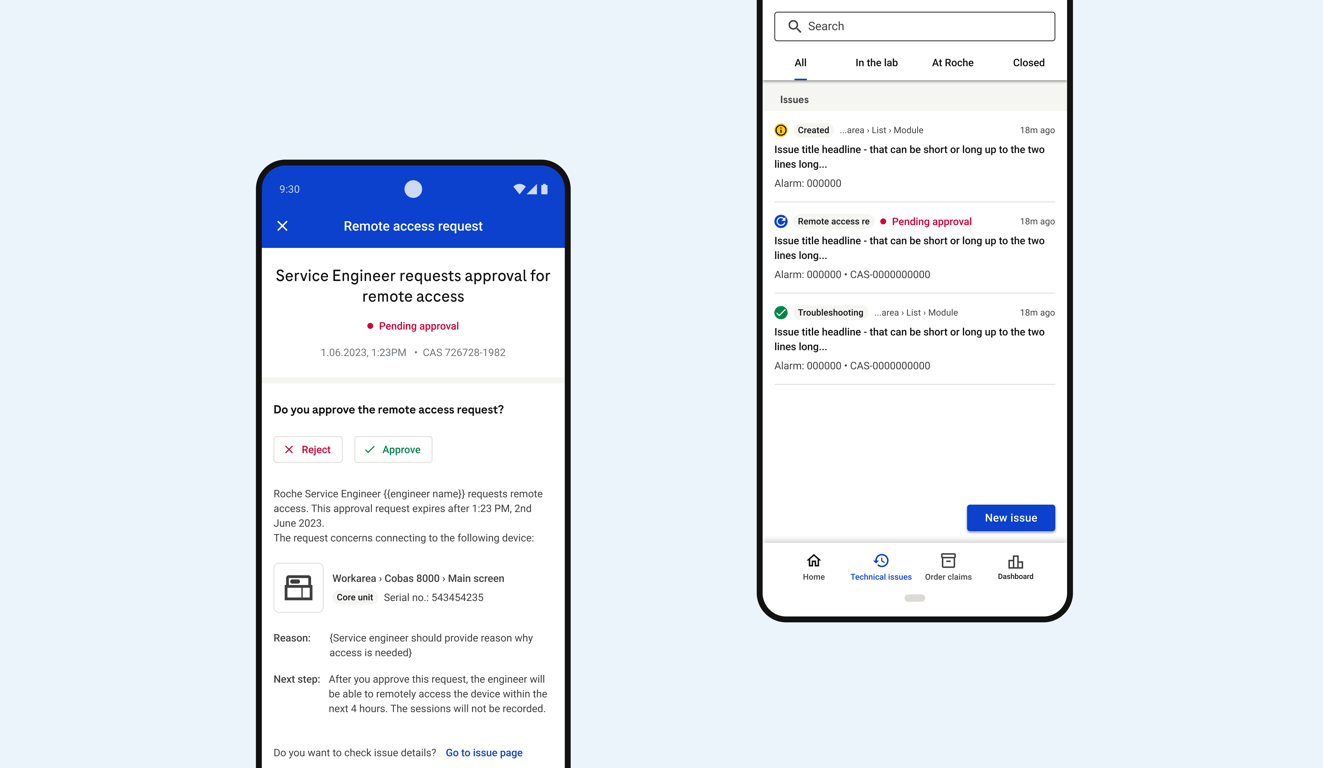
In the designed solution, the remote access request presents the most important information that needs to be acknowledged before making a decision, displaying it in an easy-to-preview format.
Final design showing a remote access request ready for lab technician approval
The decision results are also shown on the timeline within the case context as one of the actions taken to resolve the issue. This allows lab managers to see who approved the request and the reason for performing remote access.
Once a user approve request, they are redirected to issue timeline, where all updates on the issue are tracked.
Since resolving a single issue may require multiple remote access requests, an additional logic was designed to group all pending requests related to one issue, allowing customers to conveniently approve the requests in bulk.
It may happen that access to multiple devices has to be given in order to resolve one technical issue. In this case customer approves the pending requests in bulk.
Quick approval of requests is important for both engineers and users who want problems to be solved quickly. Users need to easily locate pending remote access requests. To facilitate this, multiple notification types were designed, including push, email and in-app notifications. Additionally, pending requests are highlighted on the interface that customers use daily.
Customers use Online Support daily. Pending approvals are clearly highlighted on the issue list, making them easy to spot in case any notification method is active.
Additional settings were added to Online Support that allow customers to customize their notification preferences for remote access requests, choosing between push notifications, in-app notifications, or email notifications.
Push notification allows customers to approve remote access requests with one click, or they can view more details by tapping to enter the full request view. This streamlines the approval process while being on a call with support engineers.
In some regions, customers have constant access to emails, which makes it the most effective way to notify them. The effectiveness of notifications depends on the region, e,g., in the DACH region, mobile push notifications would not be effective since smartphones are not considered standard lab equipment and the staff do not want to use their private smartphones.
After finalizing the design phase of the remote access solution, I took a systematic approach to ensure smooth implementation and knowledge transfer. I created comprehensive documentation that captured all known edge cases and logic, following this with detailed handover sessions with the development and testing team. My involvement didn't end at handover - I remained actively engaged throughout implementation, providing continuous support and addressing new edge cases as they emerged. The documentation evolved alongside the project, being regularly updated to reflect new discoveries and solutions.
Results
The implementation proved highly successful on a global scale, with users across different regions finding the solution efficient and intuitive for managing remote access requests. The system effectively streamlined the process of confirming engineer access, reducing device downtime and improving issue resolution speed. Engineers can now quickly establish remote connections to lab devices, while customers maintain full control over access permissions.
Based on collected feedback, several areas for future improvement have been identified. Future iterations will focus on enhancing requests management through improved role-based access controls. The roadmap includes adding issue resolution analytics to the main dashboard, allowing customers to track the percentage of issues resolved through remote access. This data will help organizations optimize their support processes and better understand the value of remote troubleshooting capabilities.
 Made with Bullet